> ## Documentation Index
> Fetch the complete documentation index at: https://docs.proprietas.app/llms.txt
> Use this file to discover all available pages before exploring further.
# Rent & Payments
> Rent schedules, the payment lifecycle, and overdue tracking.
When Proprietas reads a lease, it doesn't stop at the term dates — it builds the **rent schedule** and tracks every payment due, in or out.
 ## Inbound and Outbound
Every lease has a **direction**:
* **Inbound** — you're the tenant; rent goes **out**.
* **Outbound** — you're the landlord; rent comes **in**.
The same system handles both, so a managing agent collecting rent and a trust paying ground rent see one consistent rent view.
## How Schedules Are Built
From the lease, Proprietas projects a rent schedule:
* **Frequency** — monthly, quarterly (on the UK quarter days: 25 Mar, 24 Jun, 29 Sep, 25 Dec), annual, or a custom cadence
* **Per-payment amount** — derived from the annual rent
* **First due date** — anchored on the rent-commencement date, so a rent-free period at the start of a lease doesn't generate phantom early payments
Payments are materialised ahead of time (about four months out) so upcoming dues are always visible, and the generation is idempotent — re-runs never double up a payment.
Payments are never generated for dates before your organisation joined Proprietas. Onboard mid-lease and you won't be greeted by months of historical "overdue" — only what's due from here.
## The Payment Lifecycle
Each payment carries one of five settable statuses:
| Status | Meaning |
| ---------------- | ------------------------------------------------------------------------------- |
| Unpaid | Nothing has happened yet |
| Invoice Sent | You've invoiced the counterparty and are awaiting their payment (outbound rent) |
| Invoice Received | The landlord has invoiced you and you're due to pay (inbound rent) |
| Paid | Marked paid, with who and when |
| Waived | Written off, with an optional reason |
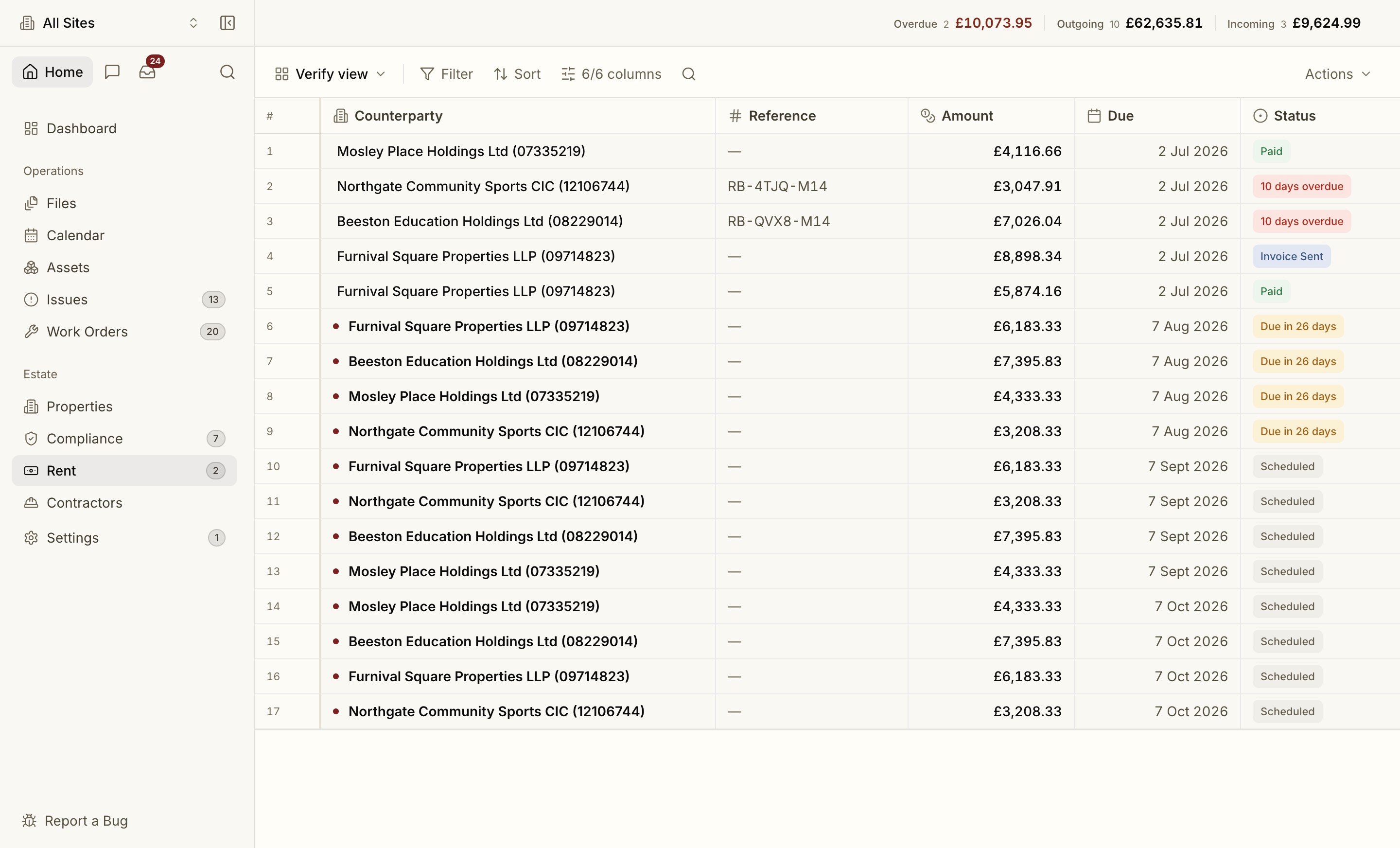
**Overdue is computed, not set.** Any unpaid or invoiced payment past its due date shows as overdue automatically, and clears the moment it's paid or waived. Overdue rent generates its own reminders, refreshed daily until it's dealt with.
Change a status without leaving the grid: hover the status chip and click the caret, or double-click the cell. The same status control lives in the payment's side peek.
* **Marking Paid is one click.** The paid date, method and any notes live in the side peek, so the quick action stays quick.
* **Waiving asks for an optional reason**, which is appended to the payment's notes so the write-off explains itself later.
Every status change is **audit-logged**, and the side peek shows an **Activity** trail of those changes: who moved it, from what, to what, and when.
## The Payment Peek
Click a row and it opens in a **side peek**, the same pattern as [Issues](/facilities/issues) and [Work Orders](/facilities/work-orders), so you never lose your place in the list. The peek carries the Amount, Site, Lease, Schedule, Paid details, Notes and the Activity trail.
## Working the List
The rent grid works like an inbox:
* **Unread indicators.** A payment nobody in your organisation has opened yet shows a dot, and the **Rent badge in the sidebar** shows the same count. Select rows and use **Mark Read** / **Mark Unread** in the grid's **Actions** menu to clear or restore them in bulk.
* **Totals in the toolbar.** Outstanding, overdue and the other portfolio totals sit at the top of the grid, so the headline numbers travel with the list.
* **Export.** Pull the list out as **CSV or JSON** from the **Actions** menu.
## Rent Reviews and Breaks
Upcoming **rent reviews** and **break dates** surface on the leases dashboard before they catch you out, each linked back to the clause in the original document.
Variations, assignments, surrenders and TR1 transfers.
## Inbound and Outbound
Every lease has a **direction**:
* **Inbound** — you're the tenant; rent goes **out**.
* **Outbound** — you're the landlord; rent comes **in**.
The same system handles both, so a managing agent collecting rent and a trust paying ground rent see one consistent rent view.
## How Schedules Are Built
From the lease, Proprietas projects a rent schedule:
* **Frequency** — monthly, quarterly (on the UK quarter days: 25 Mar, 24 Jun, 29 Sep, 25 Dec), annual, or a custom cadence
* **Per-payment amount** — derived from the annual rent
* **First due date** — anchored on the rent-commencement date, so a rent-free period at the start of a lease doesn't generate phantom early payments
Payments are materialised ahead of time (about four months out) so upcoming dues are always visible, and the generation is idempotent — re-runs never double up a payment.
Payments are never generated for dates before your organisation joined Proprietas. Onboard mid-lease and you won't be greeted by months of historical "overdue" — only what's due from here.
## The Payment Lifecycle
Each payment carries one of five settable statuses:
| Status | Meaning |
| ---------------- | ------------------------------------------------------------------------------- |
| Unpaid | Nothing has happened yet |
| Invoice Sent | You've invoiced the counterparty and are awaiting their payment (outbound rent) |
| Invoice Received | The landlord has invoiced you and you're due to pay (inbound rent) |
| Paid | Marked paid, with who and when |
| Waived | Written off, with an optional reason |
**Overdue is computed, not set.** Any unpaid or invoiced payment past its due date shows as overdue automatically, and clears the moment it's paid or waived. Overdue rent generates its own reminders, refreshed daily until it's dealt with.
Change a status without leaving the grid: hover the status chip and click the caret, or double-click the cell. The same status control lives in the payment's side peek.
* **Marking Paid is one click.** The paid date, method and any notes live in the side peek, so the quick action stays quick.
* **Waiving asks for an optional reason**, which is appended to the payment's notes so the write-off explains itself later.
Every status change is **audit-logged**, and the side peek shows an **Activity** trail of those changes: who moved it, from what, to what, and when.
## The Payment Peek
Click a row and it opens in a **side peek**, the same pattern as [Issues](/facilities/issues) and [Work Orders](/facilities/work-orders), so you never lose your place in the list. The peek carries the Amount, Site, Lease, Schedule, Paid details, Notes and the Activity trail.
## Working the List
The rent grid works like an inbox:
* **Unread indicators.** A payment nobody in your organisation has opened yet shows a dot, and the **Rent badge in the sidebar** shows the same count. Select rows and use **Mark Read** / **Mark Unread** in the grid's **Actions** menu to clear or restore them in bulk.
* **Totals in the toolbar.** Outstanding, overdue and the other portfolio totals sit at the top of the grid, so the headline numbers travel with the list.
* **Export.** Pull the list out as **CSV or JSON** from the **Actions** menu.
## Rent Reviews and Breaks
Upcoming **rent reviews** and **break dates** surface on the leases dashboard before they catch you out, each linked back to the clause in the original document.
Variations, assignments, surrenders and TR1 transfers.