> ## Documentation Index
> Fetch the complete documentation index at: https://docs.proprietas.app/llms.txt
> Use this file to discover all available pages before exploring further.
# The Assistant
> Ask your portfolio anything — and let it act, with your say-so.
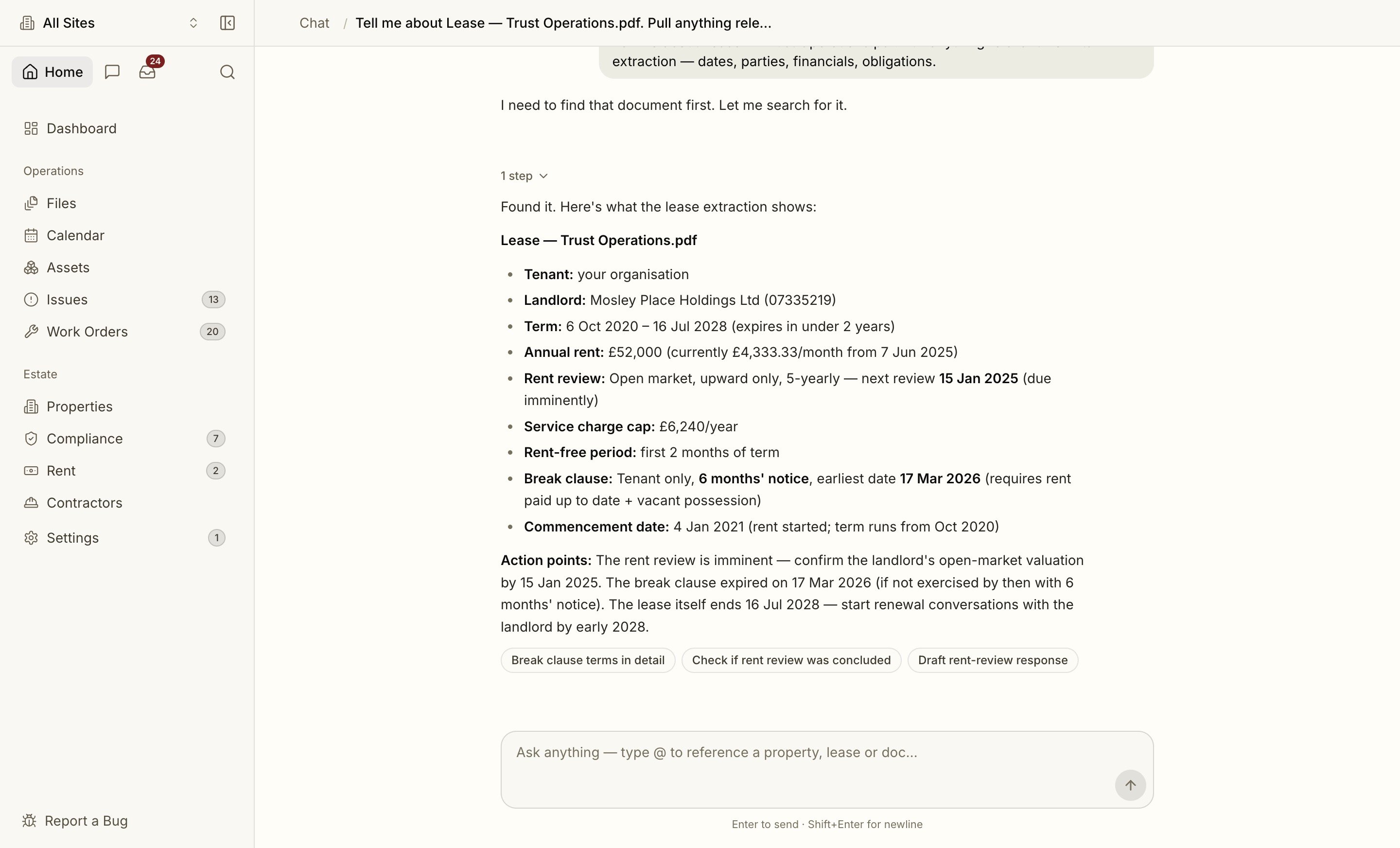
The assistant is a first-class surface in Proprietas, not a chat box stuck in the corner. Ask a question about your estate in plain English and it answers from your live data — drawing real charts and cards into the conversation, linking you to the records behind the answer, and (with your confirmation) doing the work for you.
 ## What You Can Ask
The assistant is grounded in your own portfolio, so the questions that matter are the operational ones:
* *"Which sites have an overdue EICR?"*
* *"When does the lease on the Maple Street site break?"*
* *"Show me every gas safety certificate expiring in the next 60 days."*
* *"What's our maintenance spend trend this year?"*
* *"Rent money in vs out over the last 6 months."*
* *"What does the @Brentmoor lease say about break clauses?"*
Type @ to reference a specific property, lease or document and the assistant scopes its answer to it.
## Charts and Cards, Inline
Answers aren't just text. When you ask something visual or financial, the assistant renders the **real component** straight into the conversation:
* **Rent · Money In vs Out** and **Maintenance Spend** charts — the same visualisations as your dashboard.
* **Record cards** for a site, contractor or obligation.
* **Compact tables** with an **Open in grid** link that jumps to the matching, pre-filtered view.
Try *"show me rent money in vs out over the last 6 months"* or *"what's our maintenance spend trend?"*.
## What Needs My Attention?
Ask *"what needs my attention today?"* and the assistant composes a **briefing** — overdue compliance, lease breaks and term-ends in the next 90 days, urgent issues, and rent overdue — into one card, with each item deep-linked to its record. It's the fastest way to start the day.
## Ask About a Document
Ask what a lease or certificate says — *"what's the rent review mechanism on @Caldon Academy?"* — and the assistant answers from the **extracted clauses**, quotes the relevant text, and **cites the page**. Click the citation to open the source PDF at that exact page.
## Let It Do the Work
The assistant can take action, not just report. Ask it to:
* **Raise a work order** from an issue,
* **Assign an issue** to a teammate, or
* **Log a payment** against a work order.
It proposes the action as a **confirmation card** showing exactly what it will do. Nothing happens until you press **Confirm** — then it performs the change through the same audited path as the rest of the app.
Actions are **propose → confirm → execute**: the assistant never writes to your data without an explicit confirmation. Every action it performs is recorded in the [audit trail](/security/audit-trail) and requires an **Editor** seat.
## Keep Going
Each answer is followed by **tappable follow-up suggestions** — one tap to drill in ("break it down by site", "show the last 12 months", "draft the chase email"). Entity mentions throughout an answer are clickable, and conversations persist: open the assistant from the sidebar or topbar and pick up any thread where you left off.
## Where to Find It
The assistant has its own sidebar entry and its own pages, and it's reachable from the topbar on every screen. It respects your active [property scope](/interface/navigating#property-scope) — focus on one site and the assistant answers about that site.
See where the assistant, search and scope live in the shell.
## What You Can Ask
The assistant is grounded in your own portfolio, so the questions that matter are the operational ones:
* *"Which sites have an overdue EICR?"*
* *"When does the lease on the Maple Street site break?"*
* *"Show me every gas safety certificate expiring in the next 60 days."*
* *"What's our maintenance spend trend this year?"*
* *"Rent money in vs out over the last 6 months."*
* *"What does the @Brentmoor lease say about break clauses?"*
Type @ to reference a specific property, lease or document and the assistant scopes its answer to it.
## Charts and Cards, Inline
Answers aren't just text. When you ask something visual or financial, the assistant renders the **real component** straight into the conversation:
* **Rent · Money In vs Out** and **Maintenance Spend** charts — the same visualisations as your dashboard.
* **Record cards** for a site, contractor or obligation.
* **Compact tables** with an **Open in grid** link that jumps to the matching, pre-filtered view.
Try *"show me rent money in vs out over the last 6 months"* or *"what's our maintenance spend trend?"*.
## What Needs My Attention?
Ask *"what needs my attention today?"* and the assistant composes a **briefing** — overdue compliance, lease breaks and term-ends in the next 90 days, urgent issues, and rent overdue — into one card, with each item deep-linked to its record. It's the fastest way to start the day.
## Ask About a Document
Ask what a lease or certificate says — *"what's the rent review mechanism on @Caldon Academy?"* — and the assistant answers from the **extracted clauses**, quotes the relevant text, and **cites the page**. Click the citation to open the source PDF at that exact page.
## Let It Do the Work
The assistant can take action, not just report. Ask it to:
* **Raise a work order** from an issue,
* **Assign an issue** to a teammate, or
* **Log a payment** against a work order.
It proposes the action as a **confirmation card** showing exactly what it will do. Nothing happens until you press **Confirm** — then it performs the change through the same audited path as the rest of the app.
Actions are **propose → confirm → execute**: the assistant never writes to your data without an explicit confirmation. Every action it performs is recorded in the [audit trail](/security/audit-trail) and requires an **Editor** seat.
## Keep Going
Each answer is followed by **tappable follow-up suggestions** — one tap to drill in ("break it down by site", "show the last 12 months", "draft the chase email"). Entity mentions throughout an answer are clickable, and conversations persist: open the assistant from the sidebar or topbar and pick up any thread where you left off.
## Where to Find It
The assistant has its own sidebar entry and its own pages, and it's reachable from the topbar on every screen. It respects your active [property scope](/interface/navigating#property-scope) — focus on one site and the assistant answers about that site.
See where the assistant, search and scope live in the shell.