> ## Documentation Index
> Fetch the complete documentation index at: https://docs.proprietas.app/llms.txt
> Use this file to discover all available pages before exploring further.
# Utilities
> Track electricity, gas, water and other running costs per site, month on month.
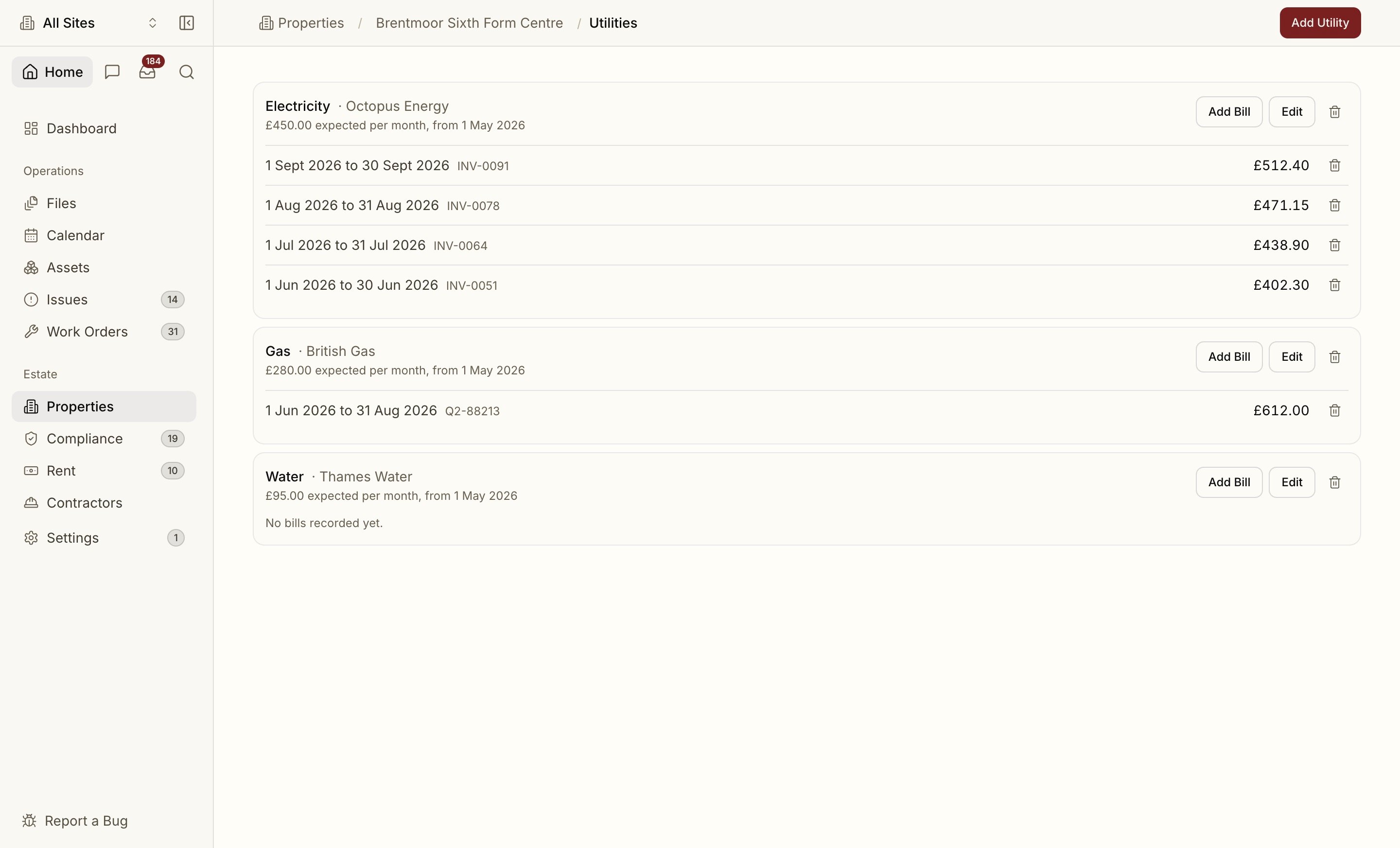
Utilities is where each site's running costs live. You set the **expected monthly cost** for a supply once, record the bills as they arrive, and the dashboard charts the cost month on month across your estate.
 ## Add a utility
Open a site and choose **Utilities**, then **Add Utility**.
| Field | Notes |
| - | - |
| **Type** | Electricity, Gas, Water, Waste, Telecoms or Other |
| **Supplier** | Who bills you |
| **Expected Monthly Cost** | The estimate used for any day without a bill. Leave it blank to track bills only |
| **Account Reference** | The supplier's account number |
| **Estimate From** | The date the estimate starts. Backdate it to fill earlier months |
When a supply stops, open **Edit** and set **Ended On**. The estimate stops after that date and the history stays.
## Record a bill
Choose **Add Bill** on a supply and enter the billing period, the total billed (including VAT) and, optionally, the invoice number.
A bill replaces the estimate for the days it covers:
* The amount is spread evenly across the billing period, so a quarterly bill counts a third in each month and a bill running mid-month to mid-month is split by days.
* Any day no bill covers falls back to the expected monthly cost.
* Two bills on one supply cannot cover the same days, so a bill entered twice is rejected.
## Upload bills instead
Drop a utility bill PDF anywhere in the app, alone or with other documents, and Proprietas files it for you:
* It reads the supplier, total and invoice number, and matches the bill to the site at the **supply address**, not the billing address.
* It reads the utility type, account number and billing period from the bill itself. An MPAN means electricity, an MPRN means gas, and cubic metres or wastewater charges mean water.
* It adds the bill to the supply with the same account number. If the site has no such supply, one is created for you, with no expected monthly cost until you set one under **Edit**.
* The PDF itself is filed in the site's **Files**, like any other document.
A bill uploaded twice, or one whose dates overlap a bill already recorded, is not counted again. A dual-fuel bill, or a document with no billing period, is filed as an ordinary document and not added to Utilities, so you can enter it by hand.
## See cost month on month
On the dashboard, press **/** or **+** and add the **Utility Cost** block. It shows:
* This month's cost and the change against last month.
* A bar per month for the last quarter, six months or year. Hover a bar for the split by utility type.
* How much of this month is still an estimate rather than billed.
Scope the app to a single site to see that site's costs alone. Clear the scope to see the whole estate.
Rent due, overdue and paid across the portfolio.
Contractor spend sits alongside utilities on the dashboard.
This documentation is built and hosted on [Mintlify](https://mintlify.com), a developer documentation platform.
## Add a utility
Open a site and choose **Utilities**, then **Add Utility**.
| Field | Notes |
| - | - |
| **Type** | Electricity, Gas, Water, Waste, Telecoms or Other |
| **Supplier** | Who bills you |
| **Expected Monthly Cost** | The estimate used for any day without a bill. Leave it blank to track bills only |
| **Account Reference** | The supplier's account number |
| **Estimate From** | The date the estimate starts. Backdate it to fill earlier months |
When a supply stops, open **Edit** and set **Ended On**. The estimate stops after that date and the history stays.
## Record a bill
Choose **Add Bill** on a supply and enter the billing period, the total billed (including VAT) and, optionally, the invoice number.
A bill replaces the estimate for the days it covers:
* The amount is spread evenly across the billing period, so a quarterly bill counts a third in each month and a bill running mid-month to mid-month is split by days.
* Any day no bill covers falls back to the expected monthly cost.
* Two bills on one supply cannot cover the same days, so a bill entered twice is rejected.
## Upload bills instead
Drop a utility bill PDF anywhere in the app, alone or with other documents, and Proprietas files it for you:
* It reads the supplier, total and invoice number, and matches the bill to the site at the **supply address**, not the billing address.
* It reads the utility type, account number and billing period from the bill itself. An MPAN means electricity, an MPRN means gas, and cubic metres or wastewater charges mean water.
* It adds the bill to the supply with the same account number. If the site has no such supply, one is created for you, with no expected monthly cost until you set one under **Edit**.
* The PDF itself is filed in the site's **Files**, like any other document.
A bill uploaded twice, or one whose dates overlap a bill already recorded, is not counted again. A dual-fuel bill, or a document with no billing period, is filed as an ordinary document and not added to Utilities, so you can enter it by hand.
## See cost month on month
On the dashboard, press **/** or **+** and add the **Utility Cost** block. It shows:
* This month's cost and the change against last month.
* A bar per month for the last quarter, six months or year. Hover a bar for the split by utility type.
* How much of this month is still an estimate rather than billed.
Scope the app to a single site to see that site's costs alone. Clear the scope to see the whole estate.
Rent due, overdue and paid across the portfolio.
Contractor spend sits alongside utilities on the dashboard.
This documentation is built and hosted on [Mintlify](https://mintlify.com), a developer documentation platform.