> ## Documentation Index
> Fetch the complete documentation index at: https://docs.proprietas.app/llms.txt
> Use this file to discover all available pages before exploring further.
# Issues
> Report a problem from a public link — no account needed.
Issues are how problems get into Proprietas — a broken boiler, a fire door propped open, a leak. Anyone can raise one; your team triages and acts.
 ## Reporting Without an Account
Every site and property has a **public reporting link** (and QR code). A tenant, member of staff or visitor opens it, describes the problem, and it lands in your Issues list — **no signup, no login**. They get a token to revisit and check the status without an account.
This is deliberate: the people who spot problems are rarely the people with logins. Removing the account barrier is what keeps your issue data real.
## Automatic Triage
When an issue arrives, Proprietas reads the description and proposes a **category** and **priority** (low / medium / high / urgent), with a short triage note. You can override either — and every correction you make is captured, so the triage gets better over time.
## Working an Issue
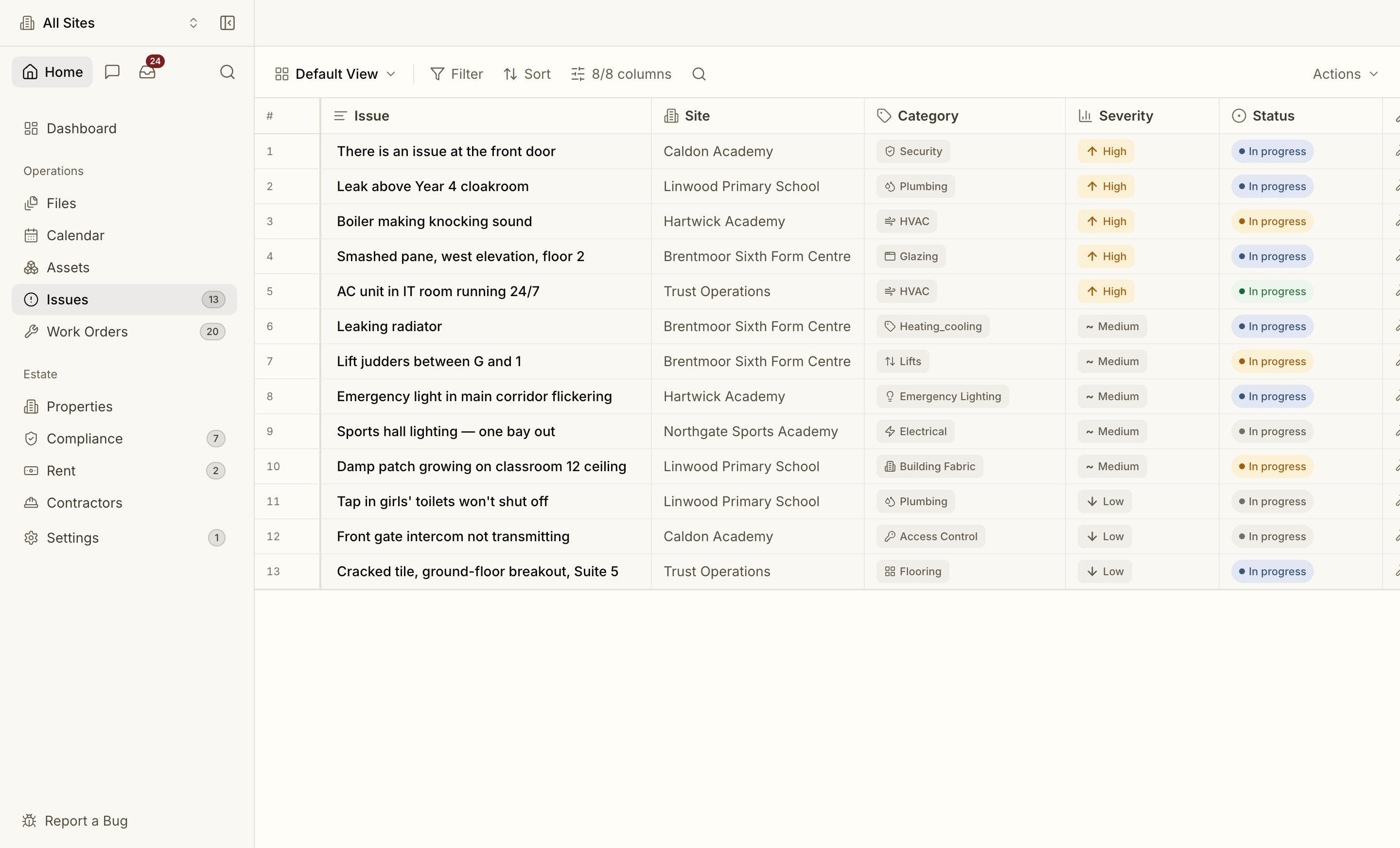
Issues move through a clear lifecycle: **New → Triaged → Assigned → In progress → Resolved → Closed** (with a Duplicate path). The list works like an inbox — unread issues are marked, filters cover status, priority, assignee ("mine" / "unassigned") and text search, and the default view shows what's still open.
Assign an issue to a team member, leave notes on the thread, and — when it needs real repair work — **promote it to a [work order](/facilities/work-orders)**. The link between the issue and the work order is kept, so the reporter's original report stays connected to the fix.
Issues, [Work Orders](/facilities/work-orders) and [Assets](/facilities/assets) all use the same **spreadsheet-style data grid** — filter, sort and search from a fixed toolbar, save views, and a frozen header while the rows scroll. Search results and the [assistant](/interface/assistant) can drop you straight into a pre-filtered grid via **Open in grid**.
Issues sitting too long with one owner are flagged automatically, with priority-aware thresholds, so nothing quietly rots in someone's queue.
Turning an issue into scheduled, costed, contractor work.
## Reporting Without an Account
Every site and property has a **public reporting link** (and QR code). A tenant, member of staff or visitor opens it, describes the problem, and it lands in your Issues list — **no signup, no login**. They get a token to revisit and check the status without an account.
This is deliberate: the people who spot problems are rarely the people with logins. Removing the account barrier is what keeps your issue data real.
## Automatic Triage
When an issue arrives, Proprietas reads the description and proposes a **category** and **priority** (low / medium / high / urgent), with a short triage note. You can override either — and every correction you make is captured, so the triage gets better over time.
## Working an Issue
Issues move through a clear lifecycle: **New → Triaged → Assigned → In progress → Resolved → Closed** (with a Duplicate path). The list works like an inbox — unread issues are marked, filters cover status, priority, assignee ("mine" / "unassigned") and text search, and the default view shows what's still open.
Assign an issue to a team member, leave notes on the thread, and — when it needs real repair work — **promote it to a [work order](/facilities/work-orders)**. The link between the issue and the work order is kept, so the reporter's original report stays connected to the fix.
Issues, [Work Orders](/facilities/work-orders) and [Assets](/facilities/assets) all use the same **spreadsheet-style data grid** — filter, sort and search from a fixed toolbar, save views, and a frozen header while the rows scroll. Search results and the [assistant](/interface/assistant) can drop you straight into a pre-filtered grid via **Open in grid**.
Issues sitting too long with one owner are flagged automatically, with priority-aware thresholds, so nothing quietly rots in someone's queue.
Turning an issue into scheduled, costed, contractor work.