> ## Documentation Index
> Fetch the complete documentation index at: https://docs.proprietas.app/llms.txt
> Use this file to discover all available pages before exploring further.
# The Contractor Portal
> Contractors accept jobs and upload certificates — no account required.
The contractor portal is a deliberate differentiator: contractors get the job done **without an account, a licence or a login**. They get a link; they do the work. This is part of what keeps contractor access **unlimited and free at every tier**.
 ## How It Works
When you assign a contractor to a [work order](/facilities/work-orders), Proprietas issues a secure access link and emails it to them.
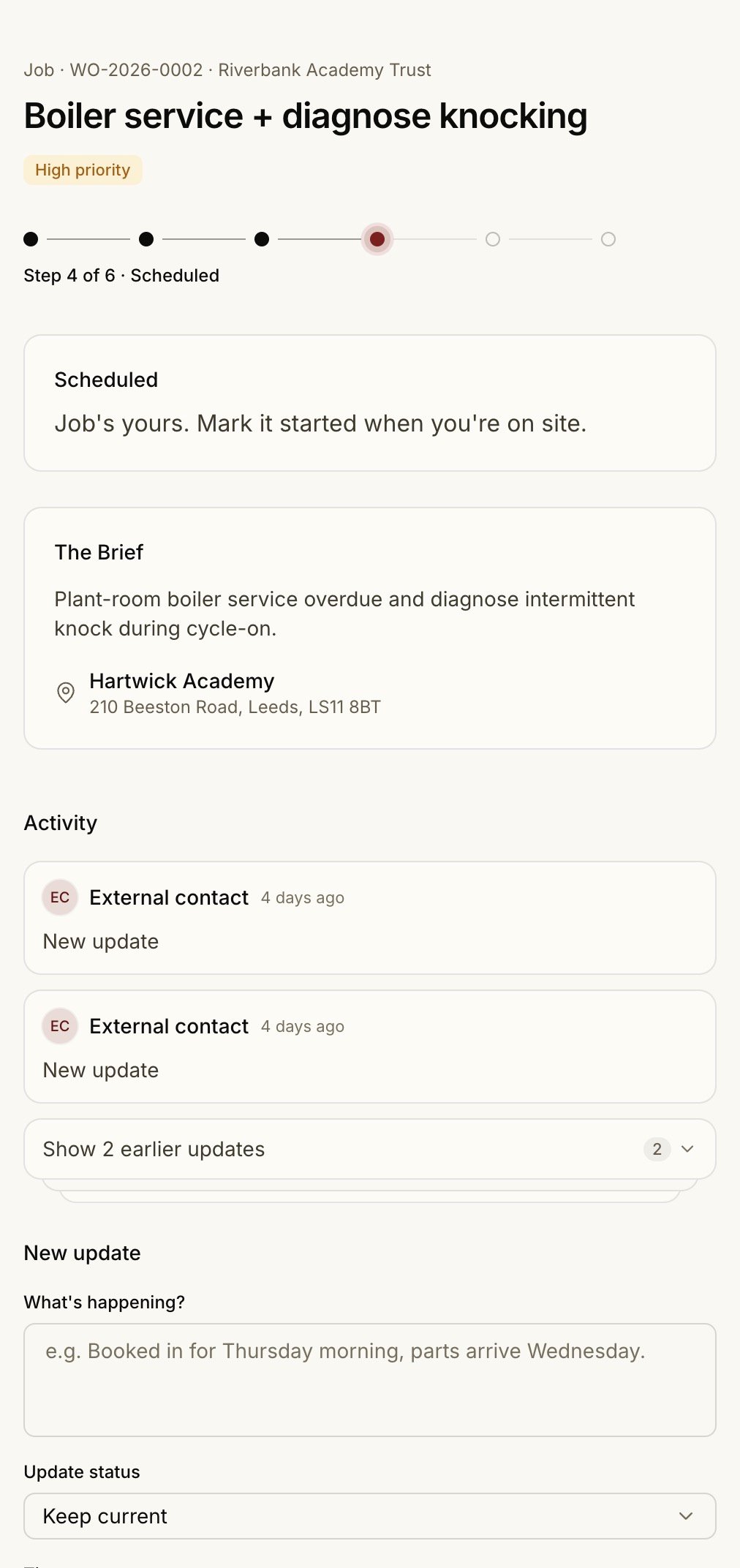
The link opens the job — description, site, the existing certificate for context — with no sign-in. They can accept, comment, log time, attach **progress photos**, and upload documents. Photos they post appear inline on the work order alongside the rest of the team's updates.
They mark the work complete and upload the new certificate or report. For a compliance renewal, the obligation closes itself with the fresh expiry — no re-keying on your side.
## Secure by Design
The link is a long, opaque token — not a guessable URL. Each link:
* Has an **expiry** (around 90 days), and is **rotatable** and **revocable** from the admin side
* **Auto-revokes** when a work order is reassigned to a different contractor
* Records **when and where** it was last opened, so you can see a job was picked up
Everything a contractor does through the portal is **audit-logged** and attributed, even though they don't have a full account — so the record is complete.
## Optional Accounts
A contractor contact who wants more than one-job-at-a-time access can link a login and sign in to see every job their company is engaged on. They still only ever see their own work. See [Contractors](/facilities/contractors#contacts-and-self-enrolment).
Light users — contractors and tenants — never count against your seat cap. The seat limit applies to editors only. See [Roles & invites](/members/roles-and-invites).
## How It Works
When you assign a contractor to a [work order](/facilities/work-orders), Proprietas issues a secure access link and emails it to them.
The link opens the job — description, site, the existing certificate for context — with no sign-in. They can accept, comment, log time, attach **progress photos**, and upload documents. Photos they post appear inline on the work order alongside the rest of the team's updates.
They mark the work complete and upload the new certificate or report. For a compliance renewal, the obligation closes itself with the fresh expiry — no re-keying on your side.
## Secure by Design
The link is a long, opaque token — not a guessable URL. Each link:
* Has an **expiry** (around 90 days), and is **rotatable** and **revocable** from the admin side
* **Auto-revokes** when a work order is reassigned to a different contractor
* Records **when and where** it was last opened, so you can see a job was picked up
Everything a contractor does through the portal is **audit-logged** and attributed, even though they don't have a full account — so the record is complete.
## Optional Accounts
A contractor contact who wants more than one-job-at-a-time access can link a login and sign in to see every job their company is engaged on. They still only ever see their own work. See [Contractors](/facilities/contractors#contacts-and-self-enrolment).
Light users — contractors and tenants — never count against your seat cap. The seat limit applies to editors only. See [Roles & invites](/members/roles-and-invites).