> ## Documentation Index
> Fetch the complete documentation index at: https://docs.proprietas.app/llms.txt
> Use this file to discover all available pages before exploring further.
# Assets
> A spreadsheet-fast register of the plant and equipment across your estate.
The asset register is where the boilers, lifts, fire panels, emergency lighting, AC units and IT kit across your estate live. It's a single, org-wide **data grid** that works like a spreadsheet — fast to scan, fast to edit, fast to bulk-update.
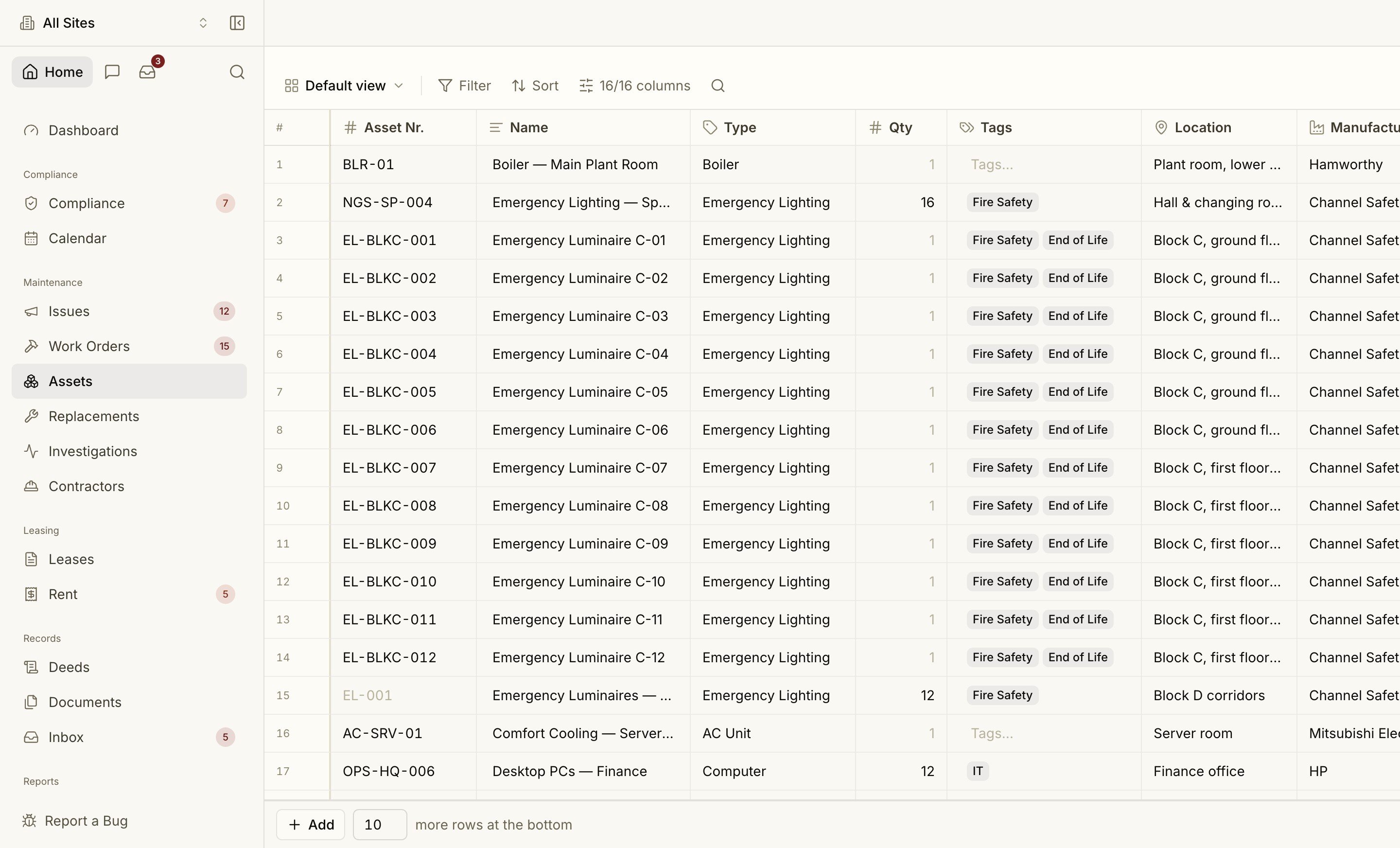 ## A Real Data Grid
Assets is a true grid, not a list of cards:
* **Inline edit** — double-click (or just start typing) in a cell to edit; Tab moves to the next cell.
* **Fill down** — drag the fill handle to copy a value down a column.
* **Filter, sort and search** from the toolbar, with **saved views** so a filtered slice is one click away.
* **Frozen header and toolbar** — they stay put while the rows scroll.
* **Multi-select** rows for bulk actions, and a **+ Add N rows** footer to append in bulk.
* **CSV import** (with a downloadable sample) and export, for moving a register in or out.
* Cmd Z to undo — including restoring rows you've deleted.
See [Keyboard shortcuts](/interface/keyboard-shortcuts#data-grids) for the full set of grid keys.
## What an Asset Holds
| Column | Notes |
| ---------------------------------------- | ------------------------------------------------------------ |
| **Asset Nr** | Your tag / reference (e.g. `LIFT-02`) |
| **Name** | Plain-English label |
| **Type** | Boiler, Lift, Fire Alarm Panel, Emergency Lighting, AC Unit… |
| **Quantity** | One line can represent a bulk run (e.g. 12 luminaires) |
| **Tags** | Free tags — Critical, Fire Safety, IT… |
| **Location** | Where it sits on site |
| **Manufacturer / Model / Serial number** | Make and identity |
| **Install batch** | Groups assets installed together |
| **Installed at / Warranty end** | Lifecycle dates |
| **Service life** | Expected years before replacement |
Assets are **org-wide**: scope to a single property and the grid narrows to that site; clear the scope to see the whole estate.
## Replacements and Fault History
Service life plus install date drive the [Replacements](/compliance/planned-maintenance) register and capital forecast — so kit nearing end-of-life surfaces before it fails. When work orders are logged against an asset, its **fault history** feeds the Investigations signals that flag a unit failing more often than its peers.
Repairs and services logged against an asset build its fault history.
## A Real Data Grid
Assets is a true grid, not a list of cards:
* **Inline edit** — double-click (or just start typing) in a cell to edit; Tab moves to the next cell.
* **Fill down** — drag the fill handle to copy a value down a column.
* **Filter, sort and search** from the toolbar, with **saved views** so a filtered slice is one click away.
* **Frozen header and toolbar** — they stay put while the rows scroll.
* **Multi-select** rows for bulk actions, and a **+ Add N rows** footer to append in bulk.
* **CSV import** (with a downloadable sample) and export, for moving a register in or out.
* Cmd Z to undo — including restoring rows you've deleted.
See [Keyboard shortcuts](/interface/keyboard-shortcuts#data-grids) for the full set of grid keys.
## What an Asset Holds
| Column | Notes |
| ---------------------------------------- | ------------------------------------------------------------ |
| **Asset Nr** | Your tag / reference (e.g. `LIFT-02`) |
| **Name** | Plain-English label |
| **Type** | Boiler, Lift, Fire Alarm Panel, Emergency Lighting, AC Unit… |
| **Quantity** | One line can represent a bulk run (e.g. 12 luminaires) |
| **Tags** | Free tags — Critical, Fire Safety, IT… |
| **Location** | Where it sits on site |
| **Manufacturer / Model / Serial number** | Make and identity |
| **Install batch** | Groups assets installed together |
| **Installed at / Warranty end** | Lifecycle dates |
| **Service life** | Expected years before replacement |
Assets are **org-wide**: scope to a single property and the grid narrows to that site; clear the scope to see the whole estate.
## Replacements and Fault History
Service life plus install date drive the [Replacements](/compliance/planned-maintenance) register and capital forecast — so kit nearing end-of-life surfaces before it fails. When work orders are logged against an asset, its **fault history** feeds the Investigations signals that flag a unit failing more often than its peers.
Repairs and services logged against an asset build its fault history.