> ## Documentation Index
> Fetch the complete documentation index at: https://docs.proprietas.app/llms.txt
> Use this file to discover all available pages before exploring further.
# Compliance Overview
> How statutory compliance tracking works in Proprietas.
Compliance is the spine of Proprietas. Every site is measured against the UK statutory regimes that apply to it, and the system tells you exactly what's overdue, due soon and valid — with reminders that arrive before a deadline does.
## Regimes and Obligations
When you create a workspace, Proprietas seeds the full catalog of UK statutory regimes — Fire Risk Assessment, legionella/L8, EICR, gas safety, LOLER, asbestos, PAT, EPC, F-Gas, TM44, fire alarm, emergency lighting, insurance certificates and more.
The seeded pack matches the property type. Mark a site as an **HMO** and Proprietas adds the **HMO licence** (Housing Act 2004 — mandatory, additional or selective) plus the tougher fire-safety and residential regimes a shared, sleeping-risk building requires, with the licence's renew-before-expiry deadline tracked like any other obligation.
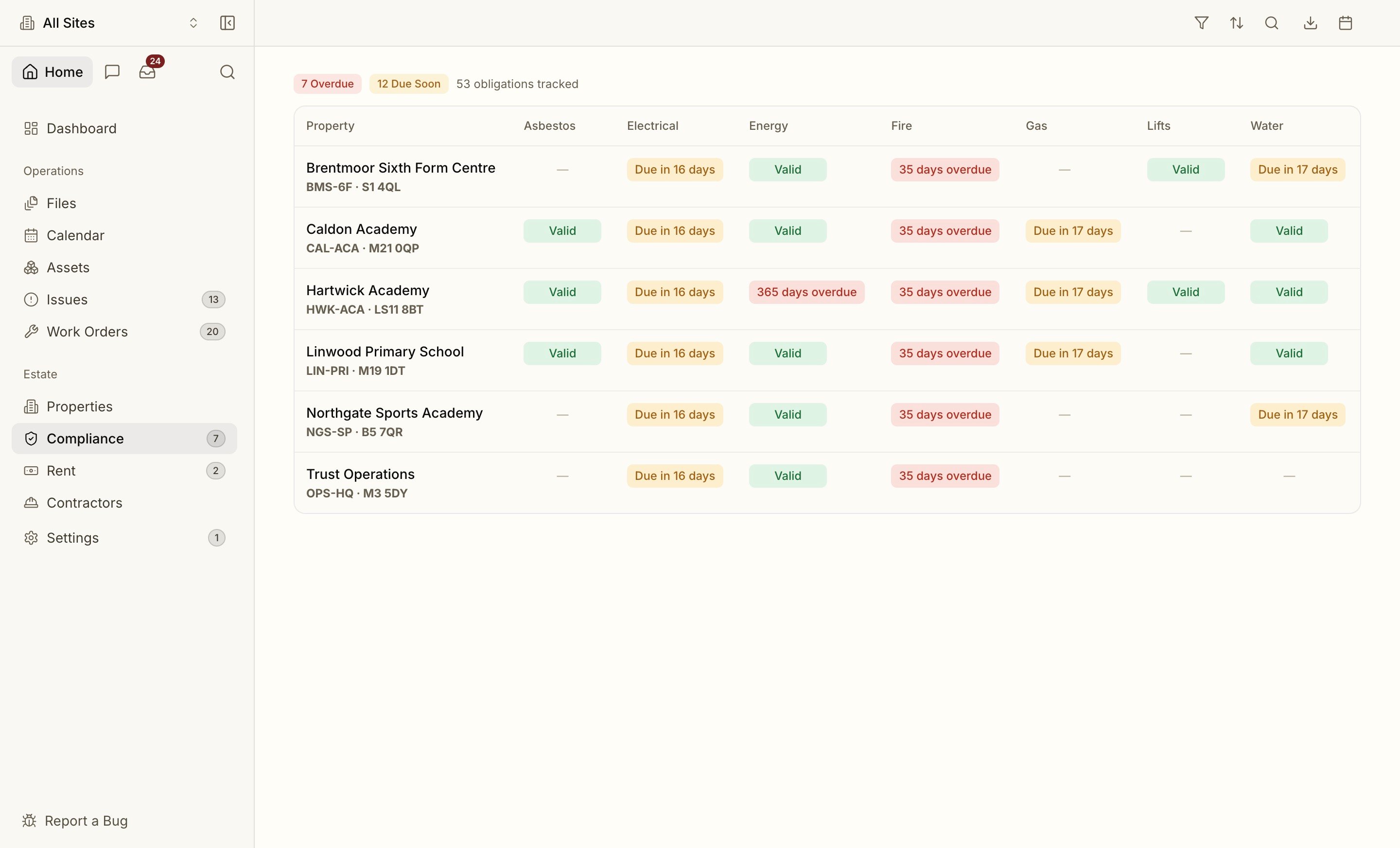
Each **site × regime** produces a **compliance obligation** with a default frequency and a computed next-due date. Obligations carry one of four statuses:
| Status | Meaning |
| ------------ | ------------------------------------------- |
| **Valid** | A current certificate is on file |
| **Due soon** | Inside the pre-expiry window |
| **Overdue** | Past the due date with no fresh certificate |
| **Expired** | The certificate's own expiry has passed |
## The Compliance View
The compliance page is a **portfolio matrix** — properties down the side, regimes across the top — so the whole estate's status reads at a glance. A unified toolbar filters, sorts and searches it, and it's **pre-filterable by deep-link**, so search and the [assistant](/interface/assistant) can drop you onto exactly the overdue slice they're describing.
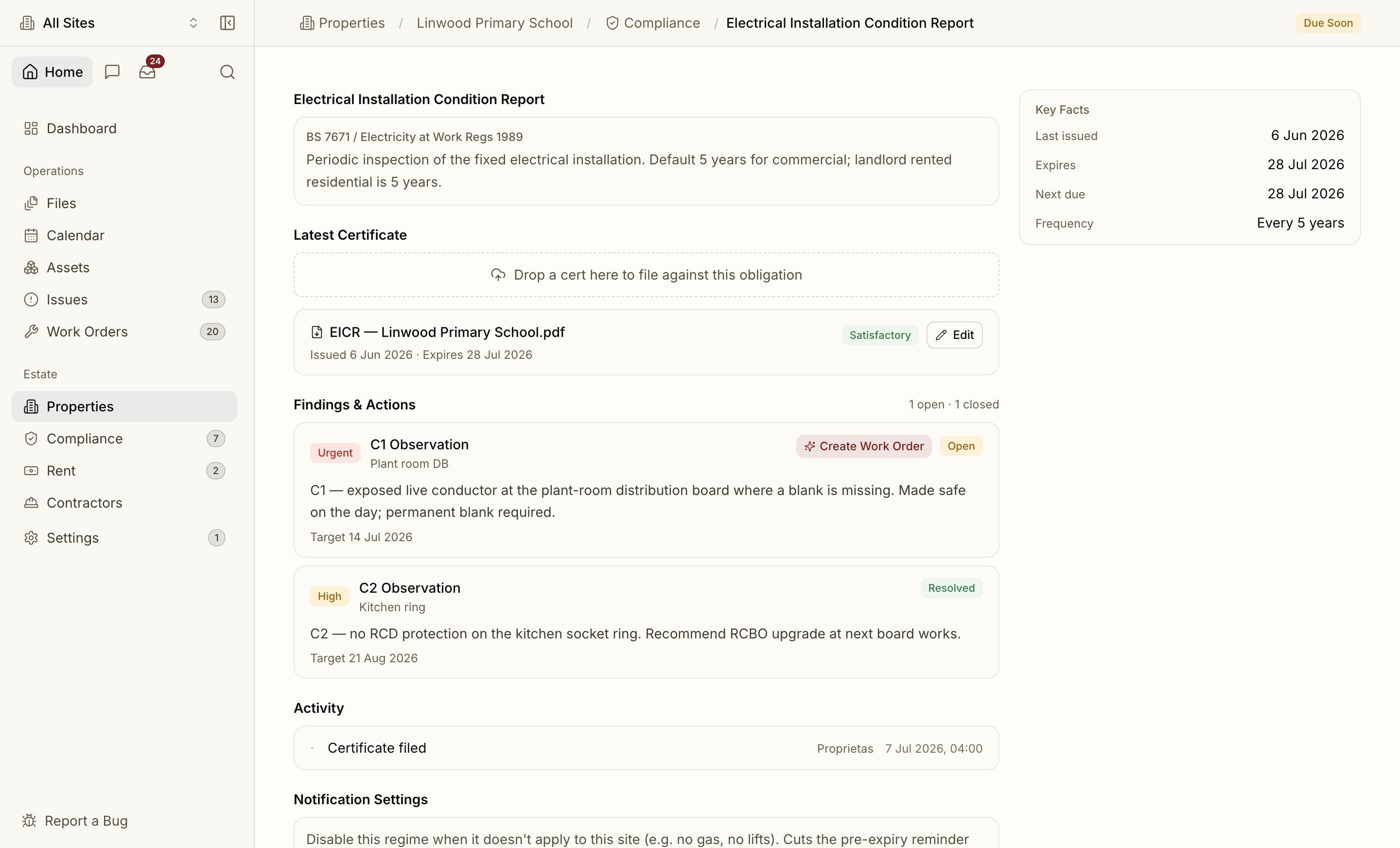
 Open any cell for the **obligation detail** page: Key Facts (last issued, expires, next due, frequency), the Responsible Person, and the **Latest Certificate** with the AI classifier's notes and confidence. **Findings & Actions** lists each observation from the certificate with a one-click **Create Work Order** to remediate it.
 ## Certificates
Upload a certificate against an obligation — or just drag the PDF onto the page and let intake route it. Proprietas reads the document, confirms the type, inspector and expiry, and closes the obligation with the new date.
Statutory dates the parser isn't confident about are held for a human to confirm rather than auto-filed — so a low-confidence read never silently sets the wrong expiry.
## Reminders
Every obligation runs a pre-expiry workflow:
* **Flags at 90, 60, 30 and 7 days** before expiry, by email and in-app.
* At the **7-day** threshold, an automatic **work order** can be raised and routed to the right contractor with the existing certificate attached.
* When the contractor uploads the new certificate through their portal, the obligation closes itself with the fresh expiry.
You control which reminders reach you in **Settings → Notifications**.
## Responsible Person
Every site has a named **Responsible Person** from day one, reassignable in a click. Reminders and escalations route to them, not a shared inbox.
## Audit Pack
One click produces an **audit pack PDF** — the certificates, dates and history an inspector (Ofsted, CQC, DSPT, insurer) wants to see, ready to hand over.
## Certificates
Upload a certificate against an obligation — or just drag the PDF onto the page and let intake route it. Proprietas reads the document, confirms the type, inspector and expiry, and closes the obligation with the new date.
Statutory dates the parser isn't confident about are held for a human to confirm rather than auto-filed — so a low-confidence read never silently sets the wrong expiry.
## Reminders
Every obligation runs a pre-expiry workflow:
* **Flags at 90, 60, 30 and 7 days** before expiry, by email and in-app.
* At the **7-day** threshold, an automatic **work order** can be raised and routed to the right contractor with the existing certificate attached.
* When the contractor uploads the new certificate through their portal, the obligation closes itself with the fresh expiry.
You control which reminders reach you in **Settings → Notifications**.
## Responsible Person
Every site has a named **Responsible Person** from day one, reassignable in a click. Reminders and escalations route to them, not a shared inbox.
## Audit Pack
One click produces an **audit pack PDF** — the certificates, dates and history an inspector (Ofsted, CQC, DSPT, insurer) wants to see, ready to hand over.