> ## Documentation Index
> Fetch the complete documentation index at: https://docs.proprietas.app/llms.txt
> Use this file to discover all available pages before exploring further.
# Certificates & Findings
> Upload certificates, capture findings, and keep an audit trail.
A compliance obligation becomes "satisfied" when you file a valid **certificate** against it. Proprietas reads the certificate, pulls the dates, and computes the status for you.
## Filing a Certificate
Open any obligation and drop the PDF onto it — or just drop it anywhere in the app and let [intake](/documents/intake) route it. The parser extracts:
* **Issue date** and **expiry date** (which drive the status)
* **Certificate number** and **inspector / inspecting body** (Gas Safe, NICEIC, etc.)
* **Outcome** — satisfactory / unsatisfactory / action required
* **Risk level** for risk assessments (low / moderate / high)
Every extracted figure is **page-cited** back to the source PDF, so you can verify it in one glance before you trust it. See [how extraction works](/documents/how-extraction-works).
Statutory expiry dates the parser isn't confident about are held for a human to confirm — they're never auto-filed wrong. You'll find them in the [Inbox](/documents/intake).
 ## Findings and Remedial Actions
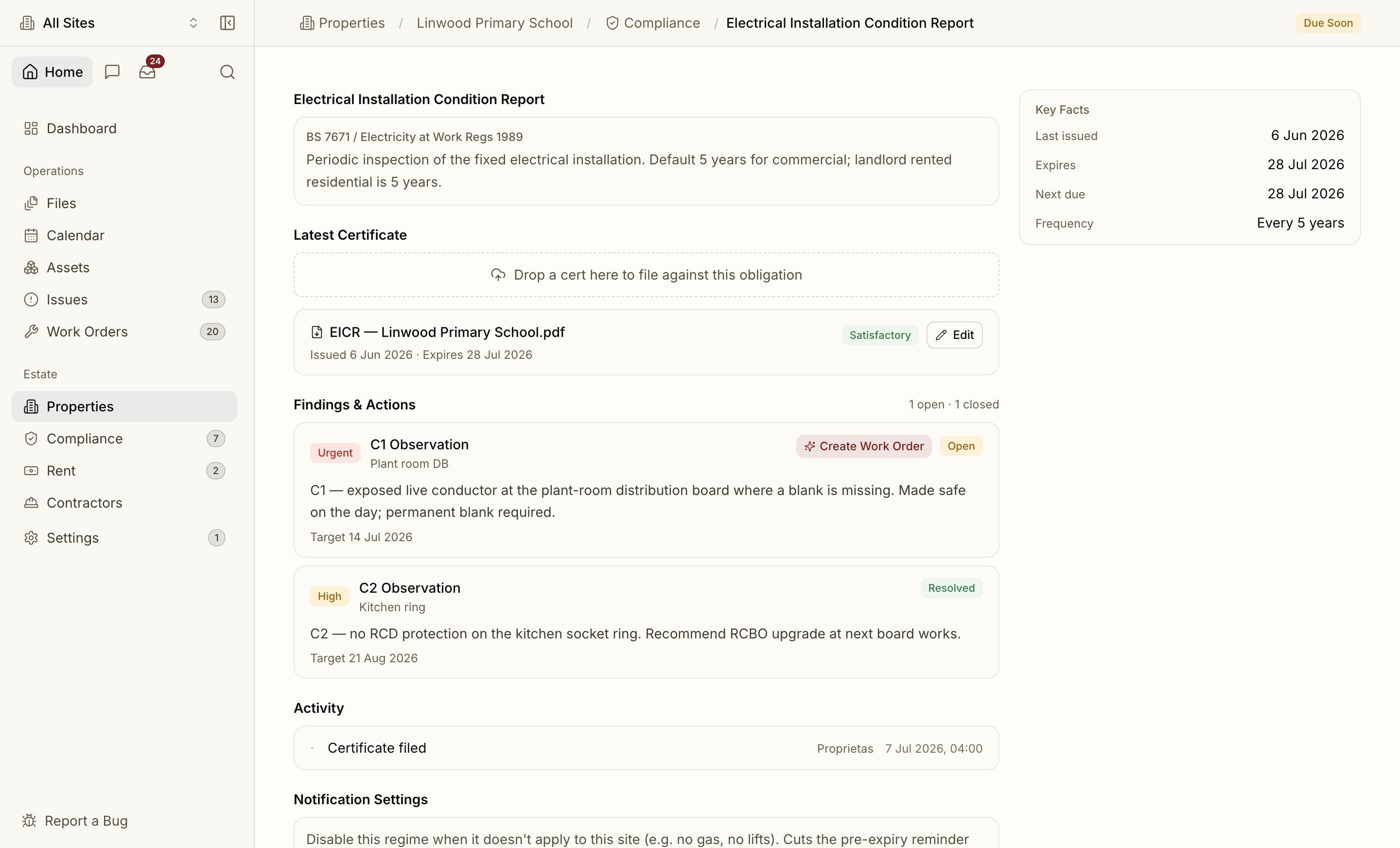
Fire risk assessments and EICRs don't just expire — they raise **findings**. Proprietas extracts each action item with its priority, category (fire door, C2 observation, emergency lighting) and recommended deadline, so the remedials don't get lost at the back of a 40-page report.
A finding can be resolved by raising a [work order](/facilities/work-orders) against it — the link is kept, so you can prove the action was closed out.
## Replacing a Certificate
When a fresh certificate supersedes an old one, the new expiry takes over and the obligation's status updates automatically. The previous certificate isn't deleted — it's marked superseded and stays in the obligation's history for the audit trail.
## Contractor Competence
If the certificate was uploaded by a contractor through the [portal](/facilities/contractor-portal), the obligation closes itself with the new expiry. Proprietas also watches the contractor's own competence certificates (Gas Safe, NICEIC, SafeContractor, CHAS) — an expired one can block them from being assigned new work until it's refreshed.
How Proprietas warns you before a certificate lapses.
## Findings and Remedial Actions
Fire risk assessments and EICRs don't just expire — they raise **findings**. Proprietas extracts each action item with its priority, category (fire door, C2 observation, emergency lighting) and recommended deadline, so the remedials don't get lost at the back of a 40-page report.
A finding can be resolved by raising a [work order](/facilities/work-orders) against it — the link is kept, so you can prove the action was closed out.
## Replacing a Certificate
When a fresh certificate supersedes an old one, the new expiry takes over and the obligation's status updates automatically. The previous certificate isn't deleted — it's marked superseded and stays in the obligation's history for the audit trail.
## Contractor Competence
If the certificate was uploaded by a contractor through the [portal](/facilities/contractor-portal), the obligation closes itself with the new expiry. Proprietas also watches the contractor's own competence certificates (Gas Safe, NICEIC, SafeContractor, CHAS) — an expired one can block them from being assigned new work until it's refreshed.
How Proprietas warns you before a certificate lapses.